Keyword Search and YouTube Link Paste
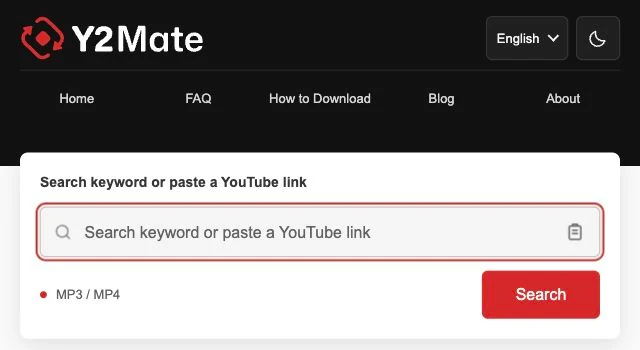
The search field accepts either descriptive keywords or a YouTube Link. Clipboard access is optional: if the paste control cannot read your clipboard, paste manually with your keyboard or device menu.

Welcome to Y2Mate, a browser-based YouTube downloader and converter for downloading available content as MP3 files or MP4 videos. Find a video through keyword search or paste a YouTube Link to reach its conversion choices. Choose music-only listening or video playback according to your needs, then save an offered file through your browser. Source access and conversion service availability determine which downloads can be prepared.
The local chart is temporarily unavailable. Search for a title or artist above.


Start with a title and artist in the search field, then select Search. For a video you already know, paste its YouTube Link and use Convert to open the available conversion choices.
Select the matching video when searching, checking its title and length. In the converter, choose an offered MP3 setting for listening or an MP4 setting when you want to keep the video.
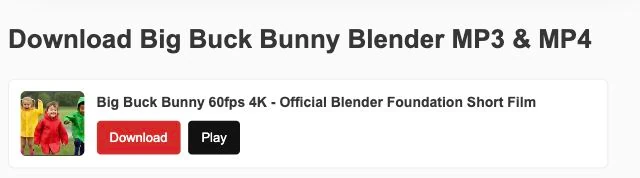
When preparation finishes and Download becomes available, use it to begin saving. Keep track of progress in your browser and note the destination folder so you can find the file afterward.
The search field accepts either descriptive keywords or a YouTube Link. Clipboard access is optional: if the paste control cannot read your clipboard, paste manually with your keyboard or device menu.
Explore music through Trending charts or related songs. Download on a Trending entry runs a song search; Download beside a related song opens conversion, so these controls lead to different next steps.
Use the browser interface to move between finding music and preparing downloads. Dark appearance offers another way to view the page; it changes the interface rather than the properties of saved files.
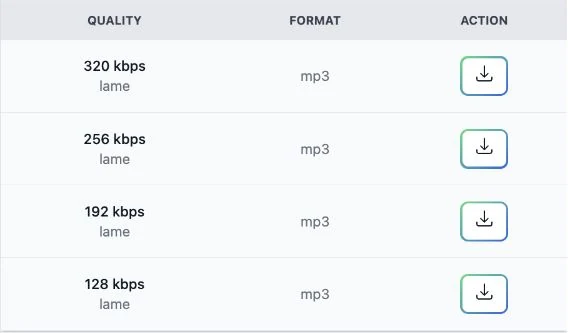
Choose MP3 when the music matters more than the video, such as listening during a commute. The YouTube MP3 Downloader may offer MP3 320kbps, 256kbps and 128kbps, depending on the source and conversion service options. For files of similar length, lower bitrates generally need less storage. Higher settings can preserve more available detail, but cannot restore missing detail from the source. Balance your MP3 download against listening needs and storage space.
An MP4 file keeps the visual content alongside the sound, making it useful for demonstrations where movement matters. The YouTube MP4 Converter may offer HD choices such as 1080p and 720p, alongside 480p, 360p, 240p and 144p. Availability depends on the source and converter; individual videos may offer only some resolutions. Smaller versions can suit a compact screen, while higher resolutions may help with fine text but require more storage and transfer data.
Use specific keywords when you need to find the right version: a song title with an artist is more useful than a genre alone. Compare channel names and durations before selecting a result. If you already have the intended video's address, a YouTube Link lets Y2Mate Downloader open conversion without another search. Replace unrelated text in the search field rather than adding the address to an existing query.
This YouTube Converter works through a browser, with no required software installation. On Android, look in the browser's download list or your file manager. On iPhone, check Files and the destination configured for your browser. Desktop browsers usually provide a download history with a folder shortcut. Saving and playback behavior vary by browser and device; a file may need to be opened manually before it appears in your preferred media app.
Recognized single-video YouTube Links cover watch-page, shortened share and embedded-video addresses. Each conversion handles one video; address recognition opens the converter but does not establish source availability or conversion success.
youtube.com/watch?v=VIDEO_IDyoutu.be/VIDEO_IDyoutube.com/shorts/VIDEO_IDm.youtube.com/watch?v=VIDEO_IDyoutube.com/embed/VIDEO_IDBrowser downloading involves practical risks, especially when advertisements resemble file controls. Keep your browser updated, retain its security protections and avoid suspicious advertisements offering prizes or urgent fixes. Never share a password or accept an unwanted installation to obtain a file. Deny unrelated permissions and leave pages that redirect unexpectedly. Check that a saved file matches the MP3 or MP4 you selected before opening it; website familiarity alone is not a safety assessment.
For a YouTube Link error, remove surrounding message text and check that the address identifies the intended video. For an MP3 conversion error, distinguish preparation problems from saving problems: third-party processing may be temporarily unavailable, while a blocked transfer can involve browser download permissions. Check storage and connectivity before retrying. Respect source restrictions, and avoid sending repeated requests while the same error remains unresolved.
Disclaimer: Y2Mate is an independently operated YouTube downloader and converter. It is not affiliated with, endorsed by, or sponsored by YouTube or Google. YouTube and related names belong to their respective owners. References to those services describe compatible links and do not imply an official partnership.
Download only content that you own or have permission to save. Follow the applicable licence conditions, including attribution where required, as well as copyright law and YouTube's Terms of Service. Personal or non-commercial use does not automatically grant permission to copy or redistribute someone else's content.
Choose Download Settings and Track Saved Files
Check the video's length before converting so an excerpt does not replace the full version you intended. Pick a bitrate or resolution that fits your listening or viewing needs rather than automatically selecting the largest file. Note the browser's save location and use a recognizable filename where supported, especially when downloading several similarly titled items.
Y2Mate is a browser-based YouTube downloader and converter for available MP3 and MP4 files. It connects video selection with conversion choices: keywords lead to results, while a recognized YouTube Link opens the converter. A prepared file can then be saved using the browser.
First search for the intended video or paste its YouTube Link. Select the correct result if needed, choose MP3 and an available bitrate, then allow conversion to finish. Use Download when offered and confirm the browser has completed saving before trying to play the file.
Browser use is free, but request limits, temporary restrictions and conversion availability can affect access. Mobile data charges may apply through your provider. Advertisements and third-party services can present separate paid offers; check their conditions rather than assuming a payment prompt belongs to the download process.
No software or extension installation is required for the browser workflow. Use the webpage controls and your browser's normal saving facilities. A prompt to add an extension or run an installer is not a necessary conversion step, so decline unexpected installation requests.
On Android, start with the browser download list and then check the Downloads folder in your file manager. On iPhone, use the browser's download indicator or Files to locate its configured destination. Confirm the transfer finished; storage settings and player support differ between devices.
The YouTube MP3 Converter may offer MP3 quality choices of 320kbps, 256kbps and 128kbps, depending on the source and conversion service. Choose a smaller bitrate when storage matters, or a higher offered setting when appropriate. Increasing the bitrate cannot repair detail absent from the original.
Choose MP4 when the visuals carry information you want to keep, such as a tutorial's on-screen steps. Select from the resolutions available for that video and converter. Consider display size, storage and playback support rather than assuming the highest listed resolution is necessary.
A YouTube Link can be incomplete after copying, or include extra words that prevent recognition. Copy it again directly from the video and check that it still opens. Removed, private or restricted videos may remain unavailable even when the address is correctly formed.
MP3 conversion can fail because the source is unavailable or the conversion service cannot process the request at that time. Check whether the video still opens, note any error message and wait before retrying. If a transfer already started, inspect browser download history for interruption details.
Check the filename and file type, and avoid opening an unexpected installer instead of music or video. Keep browser security warnings active and never provide a password in response to an advertisement. Stop if a page demands unrelated permissions or redirects to suspicious offers.
Yes. No YouTube account or sign in is required to use these search and conversion controls. You should not provide YouTube credentials to prepare a download. This workflow does not remove access restrictions or authorize conversion of videos that require permission to access.
Download only when you have the necessary copyright permission or another valid legal basis under applicable law. YouTube terms also matter and should be checked separately. Permission to watch a video does not necessarily include permission to save, share or reuse it.